Total Commander Forum Index Total Commander
Forum - Public Discussion and Support
 
 FAQFAQ   SearchSearch   MemberlistMemberlist   UsergroupsUsergroups   RegisterRegister 
 ProfileProfile   Log in to check your private messagesLog in to check your private messages   Log inLog in 

Total Commander extDir - Extended directory creator (Addon)
Goto page 1, 2, 3 ... 9, 10, 11  Next
 
Post new topic   Reply to topic    Total Commander Forum Index -> Plugins and addons: devel.+support (English) Printable version
View previous topic :: View next topic  
Author Message
Bluestar
Senior Member
Senior Member


Joined: 10 Jun 2007
Posts: 228
Location: Hungary

PostPosted: Wed Oct 05, 2011 6:54 pm    Post subject: Total Commander extDir - Extended directory creator (Addon) Reply with quote

Total Commander extDir ( Addon )
Extended directory creator utility for Total Commander.


Homepage:
Direct download link:
  • Download (Latest version: v1.6 RC3 | Release date: 19-02-2012 | 1,25 MB | MD5 (exe): fa1a2a7e86caaf96bcf6369bcc4d0ed7)
    ( alternatively you can always download an older - latest stable - version by clicking here, if you have problems with the new one... )
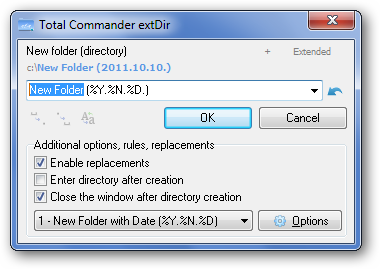
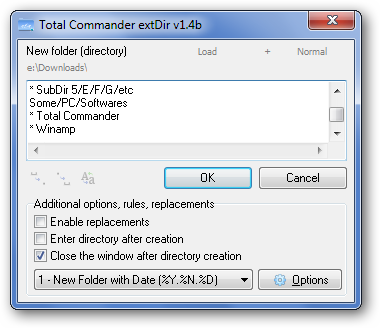
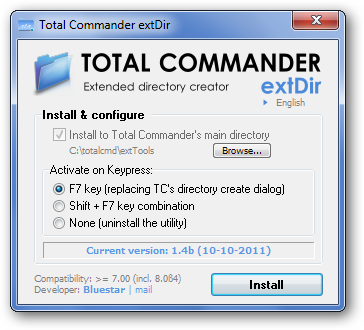
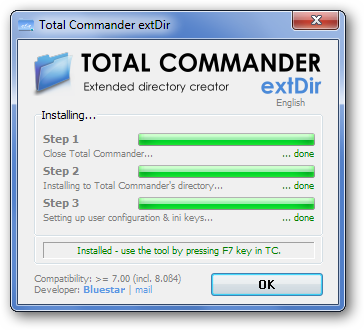
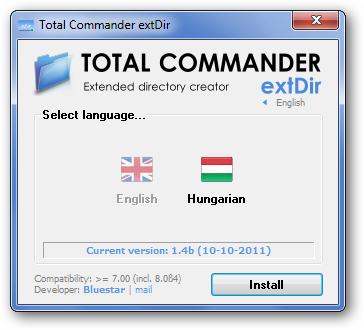
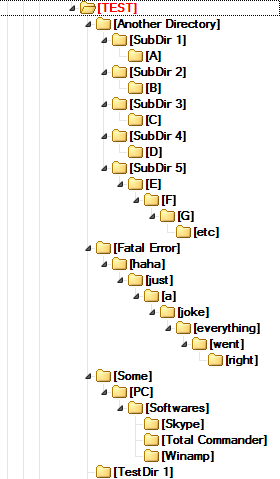
Screenshots:
What is it good for?
  • In a few words: this small utility extends your Total Commander's directory creating capabilities - after installing it, you can create a bunch of (even multi-leveled!) directories with a single click, with numerous possibilities...
Features:

  • [NEW!] Ability to set the directory attributes
  • [NEW!] Ability to create your own plugins (special variables)
  • [NEW!] Batch directory creation (Decimal / Roman / ABC)
  • [NEW!] Live Replacements (optional)
  • [NEW!] Configuration & Template Manager dialogs
  • [NEW!] Russian, Dutch, Spanish, German, Danish, Chinese, Ukrainian, Korean language support (built-in)
    Thanks to [Yustas.NeO], A. Van Landschoot, Lopeshare, Der Schrauber, petermad, efree, LonerD, cmlee (in order)
  • [NEW!] 6 built-in window color themes (optional)
  • [NEW!] VirtualPanel (wfx) plugin support
  • [NEW!] Environment variable list
  • Built-in installer & uninstaller for easier usage (run the utility out of TC's directory to activate the installer)
  • Full integration to Total Commander (F7 / Shift + F7 / user-given key combination)
  • Normal directory creation mode: almost the same as Total Commander's New Directory dialog, with a lot of advantages
  • Extended directory creation mode: you can type in (or load) a list of directories, then create them with a single click
  • Support for multi-leveled directory creation (create directories with more than one subdirs)
  • Templates - create directory with predefined templates (e.g. "New Directory (%D-%N-%y)")
  • Replacements: you can use environment variables (like %OS% or %USERNAME%) in the name of the new directory
  • Basic variables: you can use vars like %s (current second), %h (current hour), %x (unix time) etc
  • Special variables: you can use vars like {pc} (current PC name), and {wact} (current Winamp track's title)
  • Drag & Drop support (change the current directory by dragging a new dir to the extDir's window; you can also drag & drop files there, in this case the same named directories will be created)
  • Intelligent selection: press Ctrl + Tab to select the next part of the new directory's name (the next part after space)
  • Instant Modifiers: Space2Dot, Dot2Space, Invert Case - more to come, stay tuned! (also waiting for your suggestions...)
  • Refresh the current path in extDir simply by pressing F5 or Ctrl + R key combo after navigating to a new directory in Total Commander
  • Edit the current path manually (double-clicking on the path) - Total Commander is automatically navigated to the new path, if it exists
  • Enter directory after creation (optional)
  • Close extDir after directory creation (optional)
  • Undo function
  • ... and much more!
Compatibility:
  • >= Total Commander 7.00 ( heavily tested under 7.56a & 8.0 Beta 1 - 20 )
Version history:
  • You can check the complete list by clicking here.
Known bugs, limitations:
  • Installation problems? Be sure to run this utility unzipped & (if it's possible) with administrator rights directly from Total Commander.
    Please make sure you are running the utility out of Total Commander's directory (for example: c:\Downloads\tc extDir.exe) - this is the only way the installer activates.
  • Limitation: lack of Unicode support atm (an unicode version is already under development, it's in alpha phase)
  • Complete documentation is on the way too - in the meantime please check this example on how to use the "Extended mode" of the utility

Translators needed:
  • Do you feel you could translate this utility to your (native) language? It's actually pretty easy - just download this language file, open it with Notepad (or any other lightweight text editor), then post the finished work here, or simply mail me (you can find my contact mail in the utility's installer), and your language file will be in the next public version.

  • Important notice (an easy way to check your own translation): click here.


Hope you like it, questions, comments, suggestions & bug reports are very welcome.

( There's a bonus easter egg in the software, hope you guys are goin' to find it. =P )


Last edited by Bluestar on Thu Feb 07, 2013 5:42 pm; edited 77 times in total
Back to top
View user's profile Send private message Send e-mail Visit poster's website
jslegers
Junior Member
Junior Member


Joined: 17 Jul 2003
Posts: 78

PostPosted: Thu Oct 06, 2011 3:14 am    Post subject: Reply with quote

Hi,

The installation hangs at Step 3.
I have installed TCM on the default location.

John
Back to top
View user's profile Send private message
Bluestar
Senior Member
Senior Member


Joined: 10 Jun 2007
Posts: 228
Location: Hungary

PostPosted: Thu Oct 06, 2011 3:56 am    Post subject: Reply with quote

Hi John,

Thanks for you report. I'm almost sure the problem is that your "wincmd.ini" file can't be found in Application Data, probably it is in "Windows" (the default dir) or Total Commander's main directory - the problem will be fixed in a couple of hours.

If you'd like to manually install it while the fix arrives, just follow the next steps:

01. Close Total Commander's every instance.
02. Open your "wincmd.ini" file (usually in Application Data or Windows directory), and add the following lines (be sure that [Shortcuts] won't be a duplicated entry):
Code:
[Shortcuts]
F7=em_extDir

03. Save the file.
04. Open your "usercmd.ini" file (if it doesn't exists, create a new file with this name), then add the following lines (instead of "c:\totalcmd\" use the path to your TC's directory):
Code:
[em_extDir]
button=c:\totalcmd\extTools\tc extDir.exe
cmd=c:\totalcmd\extTools\tc extDir.exe
path=c:\totalcmd\extTools\

05. Save it, and you're done - this way you can use the utility by pressing F7 key in Total Commander.


Last edited by Bluestar on Thu Oct 06, 2011 6:44 am; edited 1 time in total
Back to top
View user's profile Send private message Send e-mail Visit poster's website
infimum
Junior Member
Junior Member


Joined: 08 Dec 2007
Posts: 39

PostPosted: Thu Oct 06, 2011 6:20 am    Post subject: Reply with quote

It is required that "tc extDir.exe" have to reside in a parent folder named "extDir". Is this necessary? Because there is my own way of organizing subfolders under "c:\totalcmd\", so I would appreciate if this requirement could be dropped.
Back to top
View user's profile Send private message Send e-mail
Bluestar
Senior Member
Senior Member


Joined: 10 Jun 2007
Posts: 228
Location: Hungary

PostPosted: Thu Oct 06, 2011 8:04 am    Post subject: Reply with quote

@John: Please, could you check that you have writing access to "wincmd.ini" & "usercmd.ini" files, and to Total Commander's directory (or just try installing it with Administrator rights)?

@infimum: I've made some modifications, in 1.4b you can put the utility's executable to any custom subdir(s) inside Total Commander's directory - soon it will be up - until then, if you want, you can run the 1.4a without any problem from Total Commander's main directory (some additional help by clicking here).
Back to top
View user's profile Send private message Send e-mail Visit poster's website
jslegers
Junior Member
Junior Member


Joined: 17 Jul 2003
Posts: 78

PostPosted: Fri Oct 07, 2011 2:22 am    Post subject: Reply with quote

Hi,

I have full rights to the files.
Back to top
View user's profile Send private message
Bluestar
Senior Member
Senior Member


Joined: 10 Jun 2007
Posts: 228
Location: Hungary

PostPosted: Sun Oct 09, 2011 4:20 pm    Post subject: Reply with quote

1.4b is up (the links in the first post have been updated) - sorry for being a bit late.

@John: Could you please check if you still have installation issues using the new version?
I've checked it under XP & Win7 with administrator rights, and it works just fine here with custom TC directories in both cases.

Changelog:

[2011-10-10] Total Commander extDir 1.4b
* Fixed: now the installer uses environment variables to get current Total Commander & wincmd.ini file's path
* Fixed: language-related minor gui bugs
* Fixed: version info (1.4.0.2)
* Fixed: other minor bugfixes (mainly of the installer)


Back to top
View user's profile Send private message Send e-mail Visit poster's website
jslegers
Junior Member
Junior Member


Joined: 17 Jul 2003
Posts: 78

PostPosted: Mon Oct 10, 2011 2:09 am    Post subject: Reply with quote

Hello,

It crashes when I start the installer :

Problem signature:
Problem Event Name: APPCRASH
Application Name: tc extDir.exe
Application Version: 1.4.0.2
Application Timestamp: 2a425e19
Fault Module Name: tc extDir.exe
Fault Module Version: 1.4.0.2
Fault Module Timestamp: 2a425e19
Exception Code: c0000005
Exception Offset: 000a6255
OS Version: 6.1.7601.2.1.0.256.4
Locale ID: 1043
Additional Information 1: a6c3
Additional Information 2: a6c3ecb644ad917c3fcffb39a09c7a18
Additional Information 3: dc1c
Additional Information 4: dc1c928785801237cc4eb73ed6e03ffe

Read our privacy statement online:
http://go.microsoft.com/fwlink/?linkid=104288&clcid=0x0409

If the online privacy statement is not available, please read our privacy statement offline:
C:\Windows\system32\en-US\erofflps.txt

MD5 check sum is ok.
Back to top
View user's profile Send private message
Bluestar
Senior Member
Senior Member


Joined: 10 Jun 2007
Posts: 228
Location: Hungary

PostPosted: Mon Oct 10, 2011 4:57 am    Post subject: Reply with quote

Really strange. It looks like the utility can't get the needed environment variables - are you running version 7.00 of Total Commander or newer?
Can i ask that what type of OS are you using? (32/64 bit & which version of Windows?)


Last edited by Bluestar on Mon Oct 10, 2011 6:40 am; edited 2 times in total
Back to top
View user's profile Send private message Send e-mail Visit poster's website
jslegers
Junior Member
Junior Member


Joined: 17 Jul 2003
Posts: 78

PostPosted: Mon Oct 10, 2011 5:19 am    Post subject: Reply with quote

Windows 7 SP1 Ent 32 Bit TC 7.56a.
Back to top
View user's profile Send private message
Bluestar
Senior Member
Senior Member


Joined: 10 Jun 2007
Posts: 228
Location: Hungary

PostPosted: Mon Oct 10, 2011 5:29 am    Post subject: Reply with quote

Thanks, now i'm trying to reproduce the crash.

// IMPORTANT
Anybody out there still having installation issues other than jslegers (John)? Please, report me if you do.
Back to top
View user's profile Send private message Send e-mail Visit poster's website
yeskky
Member
Member


Joined: 28 Feb 2007
Posts: 152
Location: Jiang Su,China

PostPosted: Mon Oct 10, 2011 7:38 am    Post subject: Reply with quote

Oh no!
After installing v1.4b it resets my wincmd.ini settings to default values!
_________________
#222405 Single user licence
Back to top
View user's profile Send private message
Axe1
Junior Member
Junior Member


Joined: 21 Aug 2006
Posts: 25

PostPosted: Mon Oct 10, 2011 8:34 am    Post subject: Reply with quote

Please fix initial window position.
1) extDir's window always opens on primary monitor even if I have Total Commander opened on second monitor.
2) extDir's should be centered on Total Commander's window. Not sure if it can be done properly, but please check if yo can do that.

Thanks.

PS. Also please write instructions for manual installing into readme file. Automatic installing is good, but I'm worried about loosing my settings.
Back to top
View user's profile Send private message
Bluestar
Senior Member
Senior Member


Joined: 10 Jun 2007
Posts: 228
Location: Hungary

PostPosted: Mon Oct 10, 2011 4:43 pm    Post subject: Reply with quote

@yeskky: No way, you mean you've only lost the extDir utility-related config values after the installation, aren't you?
The installer has really nothing to do with the other wincmd.ini values...

@Axe1: Thanks for reporting these window positioning bugs - i'm going to fix them in a couple of days, in the next public version.

However I think theres really nothing to worry about regarding to the installation - the utility is constantly tested on 5 PC's (win7sp1, xpsp3 [*3], xpsp3 [virtualpc]), and there weren't any case when the installer would "reset" the wincmd.ini to default values - but just for safety's sake i've created a manual installation guide (the first post is updated too).

Arrow Manual installation guide


Last edited by Bluestar on Mon Oct 10, 2011 5:03 pm; edited 2 times in total
Back to top
View user's profile Send private message Send e-mail Visit poster's website
yeskky
Member
Member


Joined: 28 Feb 2007
Posts: 152
Location: Jiang Su,China

PostPosted: Mon Oct 10, 2011 4:58 pm    Post subject: Reply with quote

I mean all!
I lost my color, custom columns, hotkeys settins and etc.
_________________
#222405 Single user licence
Back to top
View user's profile Send private message
Display posts from previous:   
Post new topic   Reply to topic    Total Commander Forum Index -> Plugins and addons: devel.+support (English) All times are GMT - 6 Hours
Goto page 1, 2, 3 ... 9, 10, 11  Next
Page 1 of 11

 
Jump to:  
You cannot post new topics in this forum
You cannot reply to topics in this forum
You cannot edit your posts in this forum
You cannot delete your posts in this forum
You cannot vote in polls in this forum


Impressum: This site is maintained by Ghisler Software GmbH

Using phpBB © 2001-2005 phpBB Group