Total Commander Forum Index Total Commander
Forum - Public Discussion and Support
 
 FAQFAQ   SearchSearch   MemberlistMemberlist   UsergroupsUsergroups   RegisterRegister 
 ProfileProfile   Log in to check your private messagesLog in to check your private messages   Log inLog in 

NiftyLink addon - Links using internal associations and more
Goto page 1, 2, 3, 4, 5, 6, 7, 8, 9, 10  Next
 
Post new topic   Reply to topic    Total Commander Forum Index -> Plugins and addons: devel.+support (English) Printable version
View previous topic :: View next topic  
Author Message
Juergen
Power Member
Power Member


Joined: 02 May 2003
Posts: 504
Location: Berlin (Germany)

PostPosted: Sun Oct 17, 2010 9:11 am    Post subject: NiftyLink addon - Links using internal associations and more Reply with quote

Hi all,

I've written a Freeware add-on for TC 7.50+ called NiftyLink.

NiftyLink is a 32 bit program for Windows 2000/XP/Vista/7, that integrates with Windows Explorer, and provides additional functionality as portable add-on for Total Commander. It allows creation and execution of special links to directories, files, and internet addresses. These Links provide possibilities, that are not given with any standard Windows link (LNK file, junction, symbolic link, or hard link).

General
  • NiftyLinks to directories and files can contain absolute paths or relative ones. Relative links are portable and work even on USB drives and e.g. inside of a Dropbox.
  • Absolute paths can contain volume names instead of drive letters. This is especially useful for USB drives, because their drive letters can change.
  • NiftyLinks can contain environment variables and pseudo environment variables (like inTotal Commander). The program itself provides the two environment variables %nifty_drive% and %nifty_path%.
  • NiftyLinks can contain self-defined shortcuts.
  • NiftyLinks to certain documents can point directly to a specific "page". The word "page" must not be taken literally: It can also be e.g. a slide of a presentation, or a record in a database. The only prerequisites are, that the corresponding program provides a function for this, and that the proper simulated keystrokes are given in the INI file.
    When you have a complete book in the form of a PDF file (not seldom these days), then you can e.g. create links to particular chapters or as bookmarks. This even works with protected PDF files.
  • When you press the [Shift] key while double-clicking at a NiftyLink, then not the target file or the target directory will be opened, but its parent directory (in TC in the current tab), and the target will be selected. Then you can rename, copy, delete or do other things with the target.
    (With a NiftyLink to an internet address, this is of course not possible.)
  • NiftyLinks are small files that consist of plain text.
    ( New interpretation of WYSIWYG: What you see is where you go. Smile )
  • NiftyLinks work on any file system (FAT, NTFS) that is supported by Windows.

Additional functions in Total Commander
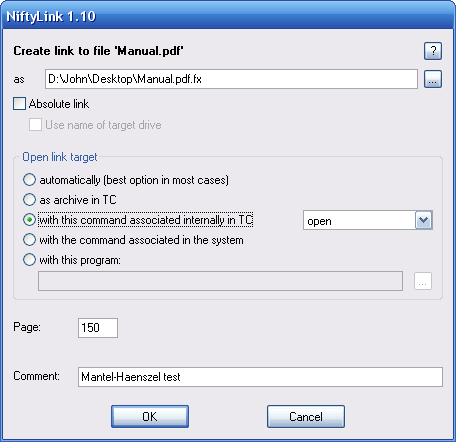
  • Extended dialog for creation of NiftyLinks.
  • NiftyLinks to directories and archieves can open them in the current tab or in a new tab – in the current or in the other panel of Total Commander.
  • NiftyLinks are aware of installed packers and Total Commander's internal associations.
  • NiftyLinks can point to directories that are provied by filesystem plugins.
  • With the content plugin "Text Line", the content of NiftyLinks can be displayed as tooltip.
    (Thanks to Vochomurka for this tip, and thanks to the authors of Text Line!)

Image: http://luethje.eu/prog/niftylink110_en_tc.png

Download the current version of NiftyLink from my website.

For details how to install and use the program please see the documentation.
Please post your questions, suggestions, and bug reports here in this thread.

Enjoy!

Regards, Jürgen
_________________
My add-ons and plugins for TC: NiftyLink, mbox, Sequences


Last edited by Juergen on Sun Jul 22, 2012 1:39 pm; edited 27 times in total
Back to top
View user's profile Send private message Send e-mail Visit poster's website
MVV
Power Member
Power Member


Joined: 03 Aug 2008
Posts: 4599
Location: Russian Federation

PostPosted: Sun Oct 17, 2010 10:07 am    Post subject: Reply with quote

Windows 7 has symbolic links that support relative paths. Smile
_________________
VirtualPanel plugin: Temporary panel for TC (forum)
TOTALCMD.NET: TCFS2, NTLinks, CopyTree, AskParam, ConPaste, Sudo…
Back to top
View user's profile Send private message Send e-mail
Juergen
Power Member
Power Member


Joined: 02 May 2003
Posts: 504
Location: Berlin (Germany)

PostPosted: Sun Oct 17, 2010 10:55 am    Post subject: Reply with quote

MVV wrote:
Windows 7 has symbolic links that support relative paths. Smile

And what if you have an USB drive with symbolic links, and want to use the drive on a system with Windows XP?
_________________
My add-ons and plugins for TC: NiftyLink, mbox, Sequences
Back to top
View user's profile Send private message Send e-mail Visit poster's website
MVV
Power Member
Power Member


Joined: 03 Aug 2008
Posts: 4599
Location: Russian Federation

PostPosted: Sun Oct 17, 2010 1:09 pm    Post subject: Reply with quote

Interesting. Smile
I didn't check that. But I'll try. Very Happy
I think XP will show folder but won't be able to enter it.


BTW why you don't use standard LNK files? They can also contain relative path (you just need to find a way to specify relative path) and they are supported by OS internally. Also icon file may be associated with LNK. Or simple BAT/CMD file can be used as flexible link - even more, it can act as script.
_________________
VirtualPanel plugin: Temporary panel for TC (forum)
TOTALCMD.NET: TCFS2, NTLinks, CopyTree, AskParam, ConPaste, Sudo…
Back to top
View user's profile Send private message Send e-mail
Juergen
Power Member
Power Member


Joined: 02 May 2003
Posts: 504
Location: Berlin (Germany)

PostPosted: Sun Oct 17, 2010 3:53 pm    Post subject: Reply with quote

MVV wrote:
Interesting. Smile
I didn't check that. But I'll try.

Please tell me the results.
Also please tell me how a symbolic link can be used, to open a document with the command to which it is associated internally in TC.

MVV wrote:
BTW why you don't use standard LNK files? They can also contain relative path

You think so? Then please tell me how this can exactly be done.
Also please tell me how a LNK file can be used, to open a document with the command to which it is associated internally in TC.

MVV wrote:
Or simple BAT/CMD file can be used as flexible link

Please tell me how a BAT or CMD file can be used, to open a document with the command to which it is associated internally in TC.
_________________
My add-ons and plugins for TC: NiftyLink, mbox, Sequences
Back to top
View user's profile Send private message Send e-mail Visit poster's website
sgp
Senior Member
Senior Member


Joined: 31 Jan 2005
Posts: 306

PostPosted: Sun Oct 17, 2010 11:08 pm    Post subject: Reply with quote

MVV wrote:
BTW why you don't use standard LNK files? They can also contain relative path (you just need to find a way to specify relative path) and they are supported by OS internally. Also icon file may be associated with LNK.
I'm skeptical that using LNK files as relative paths would work well. I could be wrong, but as far as I remember Windows resolves LNK files when you click them. While it resolves them, Windows can decide they are "broken" and "fix" them, that is by permanently changing the target they point to - if a new target can be found according to Windows LNK rules. I can imagine what uncontrollable mess of your carefully specified relative links Windows would make at that point.

But in principle, if one could intercept keypresses and mouse clicks that are directed to LNK files, then the LNK file structure could be a valid storage container for relative links, with the advantage that it can store an icon. After the keypress/click the intercept routine should resolve and run the relative link.
Back to top
View user's profile Send private message
sgp
Senior Member
Senior Member


Joined: 31 Jan 2005
Posts: 306

PostPosted: Sun Oct 17, 2010 11:34 pm    Post subject: Reply with quote

@Juergen, any chance for mouseover to show the resolved path in a tooltip?
Back to top
View user's profile Send private message
Juergen
Power Member
Power Member


Joined: 02 May 2003
Posts: 504
Location: Berlin (Germany)

PostPosted: Mon Oct 18, 2010 12:04 am    Post subject: Reply with quote

2sgp:
This is a nice idea, thank you!
Unfortunately, at the moment I don't know how this could be implemented.
Is there an internal TC function that my program can call for this purpose?

Regards, Juergen
_________________
My add-ons and plugins for TC: NiftyLink, mbox, Sequences
Back to top
View user's profile Send private message Send e-mail Visit poster's website
Vochomurka
Power Member
Power Member


Joined: 14 Sep 2005
Posts: 601
Location: Russia

PostPosted: Mon Oct 18, 2010 12:14 am    Post subject: Reply with quote

Actually, not internal.
First way is to use the Windows explorer property to show some first lines of *.txt (say) files. Second way is to use the TextLine plugin:
1) Install the TextLine plugin;
2) Configuration \ Display \ User-defined (plus button on the bottom right corner);
3) Add;
4) *.flx, *fld;
5) Field: [=textline.2] (that is, show the second line of the *.fl? files as tooltips).
_________________
PowerPro scripts for Total Commander
Back to top
View user's profile Send private message Send e-mail
Balderstrom
Power Member
Power Member


Joined: 11 Oct 2005
Posts: 2024

PostPosted: Mon Oct 18, 2010 1:35 am    Post subject: Reply with quote

Juergen wrote:
MVV wrote:
Windows 7 has symbolic links that support relative paths. Smile

And what if you have an USB drive with symbolic links, and want to use the drive on a system with Windows XP?


I'd create a folder on the C drive:
C:\USB\MyUSB1
Then:
MountVol.exe C:\USB\MyUSB1 \\?\Volume{37632a8b-ba22-11gh-1608-000c41b567d3}\

Then use junctions from there/with that path as needed.

When using the USB on a 'foreign' machine, make the folder there, and mount the USB drive again. This could even be a batch script (to create the folder, and mountvol), since the volumeID wont change.

And whenever you plug the USB drive into your machine that folder will automatically be valid/mounted and parseable.


For Win2K I did something very similiar so that I could install the OS into the paths and drives that I wanted to. Pre-prep the drive so it contains:
C:\MntHD\HDa0
C:\MntHD\HDa1
C:\MntHD\HDa2
C:\MntHD\HDa3

All of those folders are mounted to volumes. (of which none of those volumes have been assigned a drive letter).

Then:
Junction "C:\Program Files" "C:\mntHD\HDa3\Win2K_Bin\_C_"
Junction "C:\Users" "C:\mntHD\HDa3\Win2K_Usr\_C_"

On My D Drive,
Junction "D:\Program Files" "C:\mntHD\HDa3\WinXP_Bin\_D_"
Junction "D:\Users" "C:\mntHD\HDa3\WinXP_Usr\_D_"

On My E Drive,
Junction "E:\Program Files" "C:\mntHD\HDa3\Win7_Bin\_E_"
Junction "E:\Users" "C:\mntHD\HDa3\Win7_Usr\_E_"
Back to top
View user's profile Send private message Send e-mail
sgp
Senior Member
Senior Member


Joined: 31 Jan 2005
Posts: 306

PostPosted: Mon Oct 18, 2010 2:35 pm    Post subject: Reply with quote

@Juergen, On Win7 doube-clicking a .fld file sends the relative path to the address bar without a final ENTER, so no change directory takes place. Possibly ENTER is sent indeed, but with the wrong timing. I suspect that Win7 is more picky about stuffing keys than WinXP is.

@Vochomurka, I tried the textline plugin trick on Win7 but it display anything here. Also, I'd prefer for the tooltip to show a _resolved_ link, not just a relative path.
I'm not sure how to setup your other suggestion using Explorer.
Back to top
View user's profile Send private message
Juergen
Power Member
Power Member


Joined: 02 May 2003
Posts: 504
Location: Berlin (Germany)

PostPosted: Mon Oct 18, 2010 4:37 pm    Post subject: Reply with quote

2Vochomurka
That's cool, thank you!

2Balderstrom
I think using mount points and doing without drive letters is a good idea for using USB drives on my own machine. On other people's computers, I want to just plug in my USB drive and use it, without changing anything on that computer.

Anyway, double clicking on a symbolic link, a LNK file or a junction to a document will open that document with the program, to which it is associated on the respective Windows system, no?

In contrast, double clicking on a FlexLink to a document will open that document with the program, to which it is associated internally in Total Commander, if such a internal association exists. Otherwise, the document will be opened with the program, to which it is associated on the respective Windows system.
Also, a FlexLink to a directory can open that directory in a new tab in the current panel of TC or in the other panel (currently only possible by manually editing the .fld file: replace <newtab> with <newtabother>). I don't think that this is possible with a symbolic link, a LNK file or a junction.

2sgp
The TextLine plugin works well here on my system (although it doesn't seem to support UTF-8, so that target file names in a FlexLink that contain e.g. our funny German umlauts will not be displayed correctly).
Yes, the plugin just shows the respective line of the file "as is". But now I know how to do it, and I can write a similar plugin that will resolve the path before it will be displayd. However, this would be some extra amount of work, and currently I want to concentrate on the FlexLink program itself.

Thank you for reporting the problem with Win 7. Yes, on principle always a final ENTER is sent in that situation. I'll see where I can do some tests on a Win 7 machine.

Regards, Juergen
_________________
My add-ons and plugins for TC: NiftyLink, mbox, Sequences
Back to top
View user's profile Send private message Send e-mail Visit poster's website
sgp
Senior Member
Senior Member


Joined: 31 Jan 2005
Posts: 306

PostPosted: Mon Oct 18, 2010 11:23 pm    Post subject: Reply with quote

Juergen wrote:
In contrast, double clicking on a FlexLink to a document will open that document with the program, to which it is associated internally in Total Commander, if such a internal association exists.
And that's the main reason I find your program useful, since I use internal file associations extensively.
May I suggest that you add a note about this program to the wiki here http://www.ghisler.ch/wiki/index.php?title=Internal_File_Associations_Tutorial
Back to top
View user's profile Send private message
fenix_productions
Power Member
Power Member


Joined: 07 Aug 2005
Posts: 1881
Location: Poland

PostPosted: Tue Oct 19, 2010 3:04 am    Post subject: Reply with quote

2Juergen
You don't need to play with Explorer for tooltips.

If you provide your own WDX plugin for flx, fld files properties, then it can be used for "User defined" tooltips within TC interface.
_________________
"When we created the poke, we thought it would be cool to have a feature without any specific purpose." Facebook...

#128099
Back to top
View user's profile Send private message Send e-mail Visit poster's website
Juergen
Power Member
Power Member


Joined: 02 May 2003
Posts: 504
Location: Berlin (Germany)

PostPosted: Tue Oct 19, 2010 5:40 am    Post subject: Reply with quote

sgp wrote:
Juergen wrote:
In contrast, double clicking on a FlexLink to a document will open that document with the program, to which it is associated internally in Total Commander, if such a internal association exists.
And that's the main reason I find your program useful, since I use internal file associations extensively.

I agree, and I'll lay more emphasis on this point in the documentation of the program.

sgp wrote:
May I suggest that you add a note about this program to the wiki here http://www.ghisler.ch/wiki/index.php?title=Internal_File_Associations_Tutorial

Done. Smile Please feel free to correct/change it if necessary.

Thanks for the suggestion. By reading the tutorial I realized, that I had forgotten about Total Commander's ability to put an INI section into a separate file! In this case, my program will not work correctly anymore. Well, this issue can be easily corrected in the next version of the addon.


2fenix_productions
Maybe you mean someone else? I didn't write anything about Explorer here. Smile

Regards, Juergen
_________________
My add-ons and plugins for TC: NiftyLink, mbox, Sequences
Back to top
View user's profile Send private message Send e-mail Visit poster's website
Display posts from previous:   
Post new topic   Reply to topic    Total Commander Forum Index -> Plugins and addons: devel.+support (English) All times are GMT - 6 Hours
Goto page 1, 2, 3, 4, 5, 6, 7, 8, 9, 10  Next
Page 1 of 10

 
Jump to:  
You cannot post new topics in this forum
You cannot reply to topics in this forum
You cannot edit your posts in this forum
You cannot delete your posts in this forum
You cannot vote in polls in this forum


Impressum: This site is maintained by Ghisler Software GmbH

Using phpBB © 2001-2005 phpBB Group